
Download Pandora Windows – Free Audio Player for Windows 10
Overview
Pandora Windows is a lightweight, free audio program designed specifically for Microsoft Windows environments. Developed by SplashTetra Inc., the application targets music lovers who want a simple yet powerful way to stream, organize, and enjoy their favorite tunes without the clutter of modern, subscription‑based services. Though the original release dates back to 2012, Pandora Windows remains a viable option for users of Windows 8, Windows 7, and earlier versions who need a dependable music player that runs smoothly on modest hardware.
The software is offered in English and has already amassed over 24,000 installations worldwide, with a steady flow of daily downloads from countries such as the United States, Australia, and Bolivia. Its last recorded update was on October 25, 2012, which means the program is stable and free from recent feature bloat, making it an ideal choice for users who prefer a classic desktop experience. Whether you’re building a personal soundtrack, curating playlists for a small office, or simply need a reliable background music solution, Pandora Windows delivers a secure, ad‑free environment that respects your privacy while providing all the essential audio controls you expect from a modern music player.
Core Features
- Simple Interface: A clean, uncluttered UI that lets you focus on your music rather than navigating complex menus.
- Playlist Management: Create, edit, and save unlimited playlists with drag‑and‑drop support.
- Wide Audio Support: Plays MP3, WAV, FLAC, AAC, and OGG files without additional codecs.
- Background Playback: Continue listening while you work in other applications or minimize the player.
- Equalizer & Audio Effects: Built‑in 10‑band equalizer, bass boost, and virtual surround for a richer listening experience.
- Library Organization: Automatic tagging, album art retrieval, and sorting by artist, album, genre, or year.
- Low System Footprint: Consumes less than 30 MB of RAM and runs efficiently on older CPUs.
- Secure & Offline: No internet connection required for local file playback, ensuring privacy and zero data usage.
- Free Updates: Periodic security patches are released at no cost, keeping the program safe from emerging threats.
- Custom Skins: Optional skin packs let you personalize the look and feel to match your desktop theme.
Installation, Usage & Compatibility
Getting Pandora Windows up and running is straightforward, even for users with limited technical expertise. Follow these steps to install and start enjoying your music:
- Download the Installer: Click the “Download” button on the official SplashTetra page. The file is a small executable (approximately 12 MB) that downloads instantly on most broadband connections.
- Run the Installer: Double‑click the .exe file. Windows User Account Control (UAC) will prompt you to confirm the installation—choose “Yes” to proceed.
- Accept the License: Read the End‑User License Agreement (EULA) and click “I Agree” to continue.
- Select Installation Folder: The default path (C:\Program Files\Pandora Windows) works for most users, but you can choose a custom directory if desired.
- Complete Installation: Click “Install” and wait a few seconds while the files are copied. Once finished, click “Finish” to launch the application automatically.
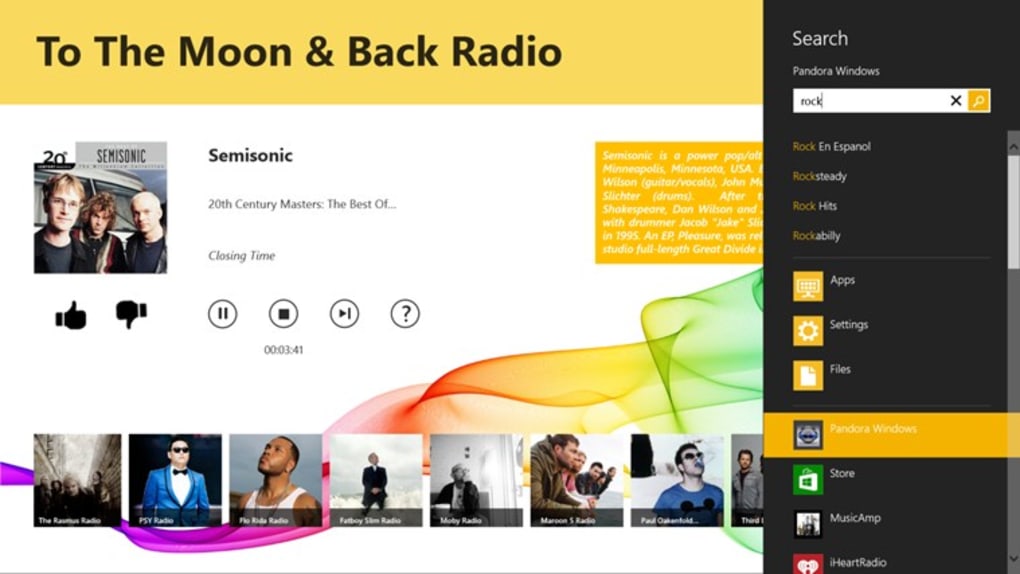
After launching Pandora Windows, you’ll be greeted by the main library view. Use the “Add Folder” button to point the player to your music collection. The program will scan the directory, retrieve metadata, and populate the library within minutes, depending on the size of your collection. Drag songs into the “Now Playing” queue, adjust the volume, or enable the equalizer for a customized sound profile.
Compatibility: Pandora Windows is built for the Windows NT family and officially supports Windows 8, Windows 7, Windows Vista, and Windows XP. Although the installer runs on Windows 10, certain legacy components may trigger compatibility warnings; however, the program remains fully functional when run in Compatibility Mode for Windows 8. Users of Windows 10 who require a modern UI may notice slight visual differences, but core playback features remain unaffected. The application does not support macOS, Linux, Android, or iOS, as it is tightly integrated with the Windows audio stack.
For optimal performance, ensure that your audio drivers are up to date. While Pandora Windows does not require an internet connection for playback, an occasional online check is performed to download the latest equalizer presets and optional skin packs. These downloads are optional and can be disabled in the settings menu.
Pros:
- Free and ad‑free.
- Lightweight on system resources.
- Supports a broad range of audio formats.
- Simple, intuitive interface.
- Robust playlist and library management.
Cons:
- No native Windows 10 visual refresh.
- Last major update was in 2012, limiting new feature development.
- No built‑in streaming service integration.
- Limited official support channels.
- Cannot run on macOS, Linux, or mobile platforms.
Frequently Asked Questions
Is Pandora Windows completely free?
Yes, Pandora Windows is offered at no cost. There are no hidden subscription fees or in‑app purchases, and the free version includes all core audio playback features.
Can I use Pandora Windows on Windows 10?
The program runs on Windows 10 when launched in Compatibility Mode for Windows 8. While the UI may look slightly dated, playback, library management, and equalizer functions work without issues.
Does Pandora Windows support high‑resolution audio files?
Yes. The player can handle lossless formats such as FLAC and ALAC, delivering high‑fidelity sound on compatible hardware.
Is there any risk of malware when downloading Pandora Windows?
When downloaded from the official SplashTetra website or reputable software portals, Pandora Windows is free from malware. Always verify the source before installing any executable.
Can I customize the look of Pandora Windows?
Yes, the application supports optional skin packs. These can be downloaded from the settings menu or third‑party sites that provide community‑created themes.
Conclusion & Call to Action
For users who value simplicity, low system impact, and a free, ad‑free audio experience on Windows, Pandora Windows remains a compelling choice. Its robust feature set—ranging from extensive format support to powerful playlist tools—covers the essential needs of both casual listeners and audio enthusiasts. Although the UI has not been refreshed for modern Windows versions and official support is limited, the program’s stability, privacy‑first design, and lightweight footprint make it a reliable backup player for older PCs or for anyone who prefers a classic desktop feel.
If you’re looking to download a secure, free audio program that won’t hog your resources, click here to download Pandora Windows now. Install it within minutes, add your music library, and enjoy crystal‑clear playback without the distraction of ads or subscriptions.







